Image to Blocks
Transform any image into 3D Revit geometry (blocks, cylinders, or exact contours) with intelligent adaptive processing.
Project Overview
Image to Blocks is a unique creative tool for Revit that converts 2D images into 3D geometry. Whether you want to create pixel art facades, perforated metal patterns, or topographic-like structures from heightmaps, this tool provides the flexibility to bring raster graphics into the BIM environment.
The tool uses advanced image processing algorithms to analyze brightness and color values, calculating adaptive thresholds to ensure optimal geometry generation. Users can choose between multiple generation modes and fine-tune parameters like block size, thickness, and dimensions.
Key Features
- Three Generation Modes: Pixels (cubes), Circles (cylinders), and Exact (tracing contours)
- Adaptive Processing: Intelligent threshold calculation based on image content
- Real-time Preview: Interactive grid overlay showing exactly what will be generated
- Parametric Control: Adjust block size, thickness, width, and height dynamically
- Color Inversion: Support for negative space generation (e.g., for perforated panels)
- Optimized Performance: Efficient handling of large images and complex geometry
Technical Implementation
- Image Processing: Bitmap manipulation and analysis algorithms
- Geometry Engine: Direct shape creation using Revit API (Extrusions)
- WPF Interactivity: Responsive UI with live visual feedback
- Memory Management: Smart handling of large bitmap data to prevent crashes
Image to Blocks Demo
Watch how Image to Blocks converts standard images into complex 3D Revit geometry in seconds.
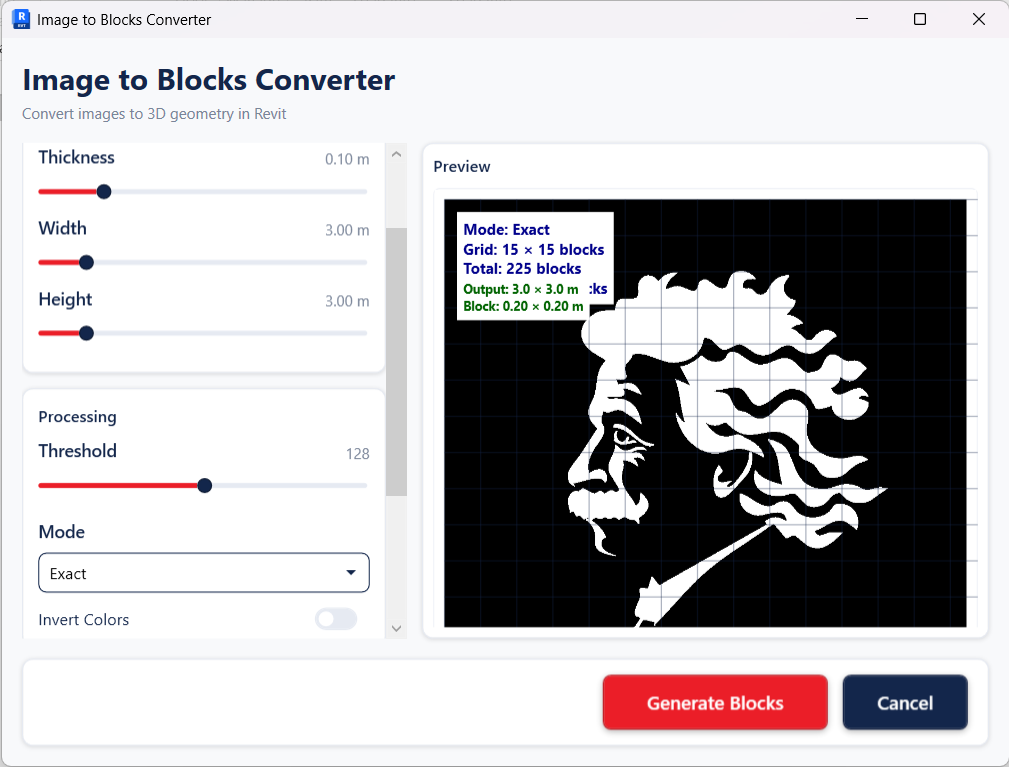
Tool Interface
Feature-rich control panel with sliders and real-time preview overlay.