
Pattern Generator
Geometric void and solid patterns on straight, curved and freeform host faces.
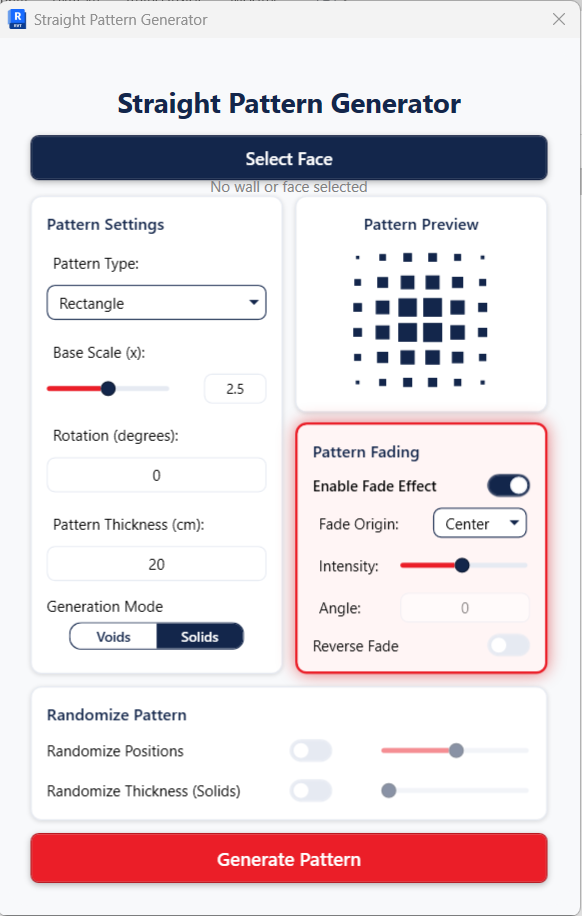
Generate panel
What it does
The straight and curved pattern generators are merged into a single tool. It maps a 2D UV pattern onto the real 3D face via face.Evaluate, so the same controls work on straight walls, curved walls and unique freeform faces alike.
Feature by feature
Capabilities
Five pattern types
Hexagonal, Rectangle, Circle, Triangle and Voronoi (organic cellular pattern).
Base Scale
Controls pattern element size, roughly 0.1×–5.0×. For Voronoi this field becomes a Random Seed (1–9999) so a layout is reproducible.
Pattern Spacing (cm)
Gap between elements. For Voronoi this becomes Number of Cells.
Pattern Thickness (cm)
Extrusion depth of the cut or relief.
Edge Margin (cm)
Inset that keeps the pattern clear of the face boundary — a true offset boundary, enforced with Sutherland–Hodgman polygon clipping.
Fade effect
Optional graduated scaling of elements by distance from an origin: Center, Top Left, Top Right, Bottom Left or Bottom Right, with an Intensity control. Fade and fixed-spacing are mutually exclusive.
Face handling
Clips patterns to the face’s true edge loops and validates every edge against Revit’s short-curve tolerance.
Delete Original Wall
Option to replace the host wall with the patterned DirectShape.
Output
A combined DirectShape (OST_GenericModel); regeneration removes the previous pattern for that wall automatically.
Related tools
More in the Generate panel
Structural shell grids and space-truss systems from any surface — mass, roof, floor or generic model.
External profile fins laid along a face’s UV, with motion that varies across the surface.
Kinetic-facade panels that respond to a driver such as sun angle.
Apply coordinated colour schemes to views and view templates.
Turn an image into a mosaic of Revit elements.
Find and bulk-select elements by their parameters.